Lead routing automation breaks in the places revenue teams already know are messy.
The demo request comes from a personal email but belongs to a named account. A second contact from the same company enters through a different form. The account owner is on leave. The territory changed last week. A partner submits a lead through the direct-sales form. A current customer asks for a new product demo. The enrichment provider returns two possible company matches. The AI classifier says "enterprise" but the source data says SMB.
If RevOps has not documented those cases, AI automation will not fix them. It will make confident assignments faster, with less context and more cleanup.
Short answer
Document lead routing edge cases before AI automation by creating a routing edge-case register with the trigger, business risk, routing precedence, required fields, owner, human review rule, allowed automation action, audit evidence, and acceptance test for each scenario. Start with duplicate records, lead-to-account matching, named accounts, existing customers, partners, territories, round robin pools, rep availability, low-confidence AI classification, scheduling handoff, SLA escalation, and CRM writebacks.
The rule is simple: if a human RevOps owner cannot explain what should happen when the routing data is incomplete, conflicting, or high-risk, an AI workflow should not be allowed to assign the lead automatically. Use this guide with Best Lead Routing Automation Tools for Revenue Operations Teams, How to Write Acceptance Tests for Lead Routing Automation Before Launch, How to Build a Lead Routing Escalation Path for Human Review, How to Monitor Lead Routing Automation After Go-Live, and the AI Agent Governance Checklist for Operations Leaders.
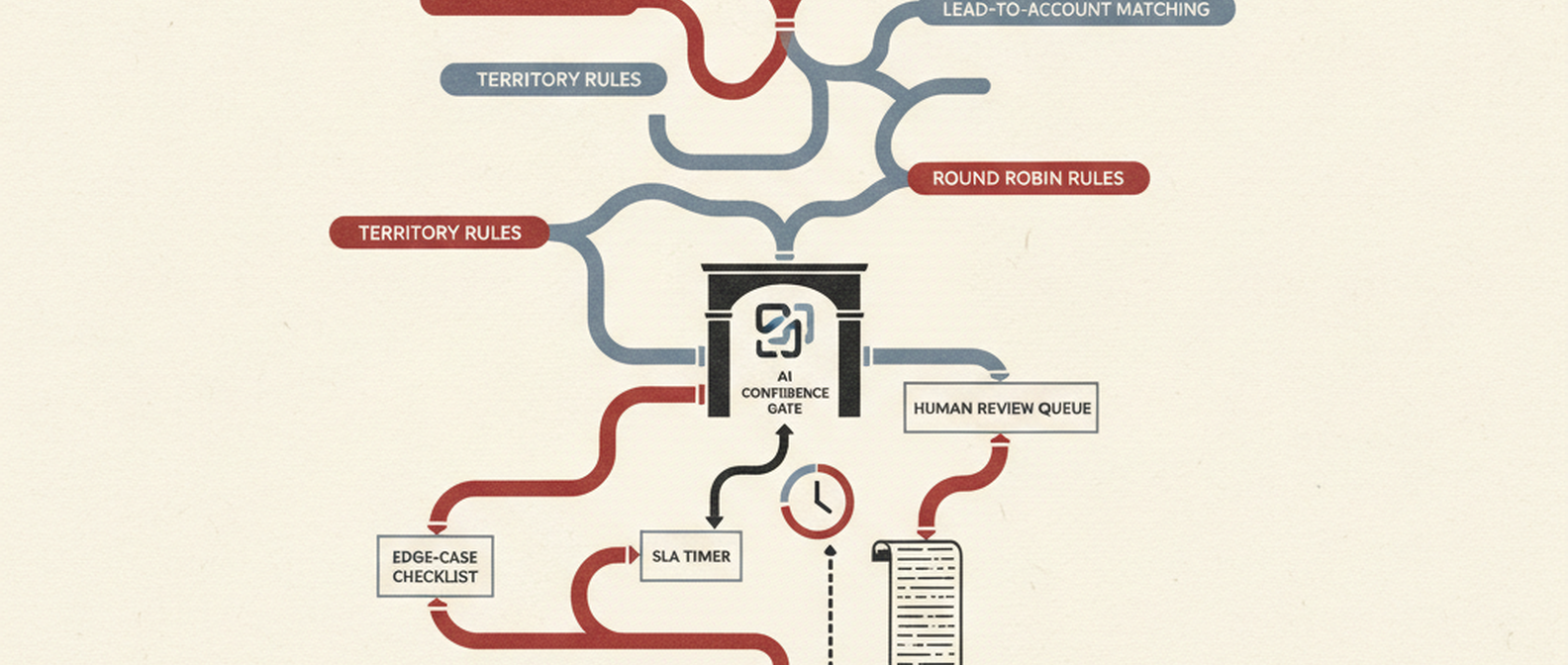
*Visual requirement: create the hero image at /blog/images/how-to-document-lead-routing-edge-cases-before-adding-ai-automation.png plus a supporting checklist graphic at /blog/images/how-to-document-lead-routing-edge-cases-before-adding-ai-automation-checklist.png. Concept: inbound lead -> required fields -> account match -> routing precedence -> AI confidence gate -> human review queue -> assignment -> SLA timer -> audit log.*
Why edge-case documentation matters before AI
Traditional lead routing is already conditional. Salesforce assignment rules assign leads to users or queues based on criteria. HubSpot workflows can assign and rotate ownership across users. Calendly Routing can qualify leads and connect form responses to HubSpot, Marketo, Pardot, Salesforce, LeanData, Distribution Engine, and meeting scheduling paths. LeanData's public routing and lead-to-account matching materials emphasize account matching, routing insights, audit logs, and traceability.
AI adds another layer of interpretation. It may classify intent, infer company fit, summarize account context, recommend an owner, detect a buying committee, or choose whether a lead belongs in sales, support, customer success, partnerships, or human review.
That can be useful. It is also dangerous if the underlying business rules are not written down.
The Red Brick Labs view is blunt: the edge-case register is the implementation brief. If the register does not exist, the AI automation project is still guessing.
The lead routing edge-case register
Create one register for routing exceptions before you build AI into the workflow. A spreadsheet is fine at first, as long as the fields are structured enough to become workflow rules, review queues, test cases, and monitoring dashboards.
| Field | What to document | Example |
|---|---|---|
| Edge-case ID | Stable reference for the scenario | LR-EDGE-014 |
| Scenario | Plain-language description | Personal-email demo request from an existing target account |
| Trigger | What the system detects | Email domain is personal, company field matches named account with medium confidence |
| Business risk | Why the case matters | Wrong owner could split strategic-account context |
| Routing precedence | Which rule wins | Named account owner before round robin |
| Required fields | Data needed to decide | Company name, website, account match, current owner, lifecycle status |
| Default owner | Who gets the case first | RevOps review queue |
| Escalation owner | Who decides unresolved conflicts | Sales ops lead or enterprise sales manager |
| AI assistance allowed | What AI may do | Summarize likely account matches and confidence reasons |
| Human decision required | Whether a person must approve, reject, or correct | Yes, if match confidence is below threshold |
| System action | What happens after decision | Assign to account owner, route to SDR pool, or request more info |
| Audit evidence | What must be logged | Input fields, match candidates, confidence, rule fired, reviewer, timestamp |
| Acceptance test | How the case is proven before launch | Historical personal-email lead routes to review, not auto-assignment |
This is not documentation theater. It is how RevOps turns tribal routing knowledge into automation controls.
Step-by-step workflow to document routing edge cases
1. Map the clean routing path first
Start with the path that should happen when nothing is weird.
Document:
- lead source: website form, chat, demo request, event scan, partner form, product signal, list import, or manual creation;
- systems involved: form, marketing automation, enrichment, CRM, routing tool, calendar, sales engagement, Slack, data warehouse;
- required fields: email, company, domain, country, state, employee count, industry, product interest, source, campaign, consent, lifecycle stage;
- routing object: lead, contact, account, company, opportunity, meeting, task, or custom object;
- assignment model: account owner, territory owner, named SDR, round robin pool, queue, partner owner, customer owner, or human review;
- completion state: assigned, scheduled, queued, escalated, disqualified, merged, held, or sent to review.
If the clean path is not written down, the edge cases will become a debate about memory.
2. Pull real exceptions from the last 60 to 90 days
Do not invent edge cases from a whiteboard. Pull the real records that caused manual cleanup.
Look for:
- leads manually reassigned after initial routing;
- leads assigned to inactive, unavailable, wrong-region, or wrong-segment owners;
- demo requests from existing customers or open opportunities;
- personal-email leads that should have matched known accounts;
- duplicate leads from the same company or buying committee;
- partner, agency, reseller, or channel leads that entered direct sales;
- unassigned leads, fallback-owner leads, and queue-stuck leads;
- records with enrichment failures or conflicting enrichment;
- leads that booked with the wrong rep or wrong event type;
- routed leads that missed first-touch SLA;
- routing disputes from sales managers or account owners.
For each one, write the actual failure reason. "Bad routing" is not a useful reason. "Lead matched three account candidates and the workflow chose round robin before account-owner preservation" is useful.
3. Separate routing lanes
One register can hold all cases, but the workflow needs lanes. Mixing every inbound motion into one routing policy creates brittle automation.
| Lane | Common edge cases | Documentation focus |
|---|---|---|
| Website demo requests | Personal email, duplicate account, wrong segment, instant scheduling conflict | Qualification fields, meeting route, account match, SLA |
| Named accounts | Buying committee, subsidiary, stale owner, executive account coverage | Account ownership precedence, owner backup, human review |
| Existing customers | Expansion interest, support request, renewal context, customer success owner | Customer-owner preservation, sales vs CS routing |
| Partner and channel | Partner-submitted direct lead, deal registration conflict, reseller ownership | Source rules, partner owner, conflict review |
| Event and webinar leads | Batch imports, missing campaign data, stale territory fields | Import validation, dedupe, campaign preservation |
| Product-led signals | Anonymous domain, workspace ownership, usage threshold, free-domain users | Account matching, fit scoring, sales trigger threshold |
| International routing | Unsupported country, tax region, language, local coverage | Territory source of truth, fallback owner, compliance note |
AI classification can help sort these lanes. It should not invent precedence after the fact.
4. Define ownership precedence before assignment rules
Most routing edge cases are precedence problems. Two or more rules could apply, and the system needs to know which one wins.
Use a written order like this:
| Precedence | Rule | Why it comes first |
|---|---|---|
| 1 | Do-not-route or compliance hold | Consent, suppression, competitor, student, abuse, or legal restriction |
| 2 | Existing customer or open opportunity | Protect current commercial relationship |
| 3 | Named or strategic account | Preserve account strategy and executive coverage |
| 4 | Partner, reseller, or channel conflict | Avoid channel conflict and credit disputes |
| 5 | Duplicate or matched-account ambiguity | Stop before splitting account context |
| 6 | Territory or segment assignment | Route by approved GTM coverage model |
| 7 | Product, use case, or specialist assignment | Send complex demand to the right specialist |
| 8 | Round robin or pooled assignment | Distribute clean, eligible leads fairly |
| 9 | Fallback queue | Catch anything unresolved with an SLA |
Salesforce assignment rules and HubSpot workflows can run criteria and ownership actions, but the business still has to decide this order. AI should read from the precedence model, not replace it.
5. Write deterministic checks before AI rules
If a decision can be made with a lookup, comparison, threshold, or formula, document that first.
Examples:
- Does the email domain match an existing account domain?
- Does the company name match one account, multiple accounts, or none?
- Is the account a customer, prospect, partner, reseller, competitor, or target account?
- Is there an open opportunity?
- Is the current owner active and eligible?
- Is the rep out of office, over capacity, or excluded from the pool?
- Does the country map to a territory?
- Does employee count or revenue band map to the right segment?
- Is the lead source approved for direct sales routing?
- Does consent allow sales outreach?
- Is the requested product supported by the assigned team?
- Did the calendar handoff return the correct event type?
Then document where AI is allowed:
- classify inbound intent from form text;
- summarize account context for the reviewer;
- suggest the most likely account match with reasons;
- detect missing or suspicious routing data;
- recommend a review owner;
- cluster repeated routing failures after review.
The control decision should come from RevOps policy. AI should help the team understand the case faster.
6. Define human review gates
Human review is not a vague "send to RevOps" step. It needs a trigger, owner, SLA, decision options, and evidence packet.
Create review gates for:
- low-confidence AI classification;
- multiple account matches;
- personal email plus strategic-account signal;
- existing customer or open-opportunity conflict;
- partner or channel conflict;
- named-account owner unavailable;
- inactive CRM owner;
- unsupported country or territory;
- high-value lead with missing enrichment;
- duplicate contact or company conflict;
- consent or suppression ambiguity;
- scheduling mismatch between CRM owner and calendar owner.
For each gate, define what the reviewer sees:
- original form submission;
- normalized and raw field values;
- enrichment output and confidence;
- account, contact, opportunity, and customer matches;
- current owners and eligibility;
- rule path proposed by the automation;
- AI recommendation and confidence;
- possible decisions;
- audit history.
Reviewers should not have to open six tools just to answer one routing question. If they do, the documentation should flag that as an integration gap before automation starts.
7. Decide what the system may do after each decision
Document post-review actions with the same discipline as assignment rules.
| Human decision | Allowed system action |
|---|---|
| Confirm match | Assign to account owner, preserve source data, and start SLA timer |
| Reject match | Route to territory, segment, or round robin based on next rule |
| Merge duplicate | Link records, preserve campaign history, and assign according to surviving account |
| Send to partner owner | Notify channel owner and suppress direct-sales round robin |
| Send to customer owner | Assign to AE, CSM, or expansion owner based on customer policy |
| Request more information | Create task, notify requester, and pause SLA or mark pending |
| Escalate | Send to sales ops, manager, or RevOps owner with reason |
| Hold | Prevent assignment, scheduling, or outreach until approved |
This is where AI governance matters. NIST's AI Risk Management Framework is a useful backdrop because it emphasizes governance, mapping, measurement, and management of AI risk. In RevOps language: know what the system is allowed to do, log what it did, measure where it fails, and keep accountable humans in the loop.
8. Turn every edge case into an acceptance test
Every edge case in the register should become a pre-launch test.
Use this format:
| Field | What to capture |
|---|---|
| Test ID | LR-EDGE-UAT-01 |
| Scenario | Personal-email demo request from named account |
| Given | Lead submits form with Gmail address and company name that matches target account |
| When | Lead enters AI-assisted routing workflow |
| Then | AI suggests the matched account, but the lead enters human review because confidence is below threshold |
| Evidence | Form fields, match candidates, confidence, review queue entry, reviewer decision, final owner, audit log |
If the workflow cannot produce evidence, it is not ready for AI-assisted routing.
Common lead routing edge cases to document
Use this checklist as the linkable asset for the article.
| Edge case | What to document | Default posture |
|---|---|---|
| Personal email with company name | Match sources, confidence threshold, review owner | Review before strategic assignment |
| Multiple matched accounts | Match precedence, tie-breakers, reviewer | Human review |
| Existing customer lead | AE vs CSM vs expansion owner policy | Preserve customer context |
| Open opportunity | Opportunity owner, account owner, SDR role | Route to opportunity owner or review |
| Named account | Named owner, backup owner, executive coverage | Named owner before round robin |
| Partner lead | Partner source, deal registration, channel owner | Channel review |
| Competitor, student, vendor, agency | Suppression or non-sales routing rule | Do not enter sales pool |
| Duplicate contact | Merge rule, campaign preservation, surviving owner | Deduplicate or review |
| Inactive owner | Backup owner, manager, queue, SLA | Skip inactive owner |
| Rep unavailable | Out-of-office, calendar, capacity, coverage | Skip, backup, or queue |
| Unsupported country | Territory owner, language, compliance note | Queue with SLA |
| Missing enrichment | Required fields, retry, fallback, review | Review if high value |
| Conflicting enrichment | Source priority, confidence, manual correction | Review |
| AI low confidence | Confidence threshold, reviewer, allowed action | Human review |
| Wrong scheduling route | CRM owner vs calendar owner, event type | Stop before booking |
| SLA breach | Timer source, escalation owner, reassignment | Alert and escalate |
| Manual override | Who changed owner, why, pattern tracking | Log and review weekly |
| Fallback owner overuse | Trigger threshold, root-cause owner | Investigate |
The purpose is not to capture every imaginary edge case. It is to capture the cases that could misroute real demand, break account context, create credit disputes, or hide pipeline.
Lead routing edge-case checklist
Before adding AI automation, RevOps should be able to check every item below.
| Checklist item | Pass condition |
|---|---|
| Clean path documented | Source, systems, fields, owner model, scheduling path, and completion states are written down |
| Edge-case register created | Each scenario has trigger, risk, owner, action, audit, and test fields |
| Routing lanes separated | Demo, named account, customer, partner, event, PLG, and international paths are not mixed blindly |
| Precedence order approved | Compliance, customer, named-account, partner, duplicate, territory, specialist, round robin, and fallback rules have a clear order |
| Required fields defined | Capture, enrichment, matching, routing, scheduling, and reporting fields are listed |
| Deterministic checks written | Lookup, match, threshold, consent, owner, territory, and availability checks run before AI judgment |
| AI role constrained | AI can classify, summarize, suggest, and flag; it cannot silently override high-risk ownership rules |
| Human review gates defined | Ambiguous, high-value, low-confidence, and conflict cases have owner, SLA, and decision buttons |
| Review packet specified | Reviewer sees source data, matches, confidence, current owners, proposed route, and audit history |
| Post-review actions defined | Approve, reject, merge, hold, escalate, assign, schedule, or request-info actions are controlled |
| Acceptance tests written | Every material edge case has a given/when/then test with evidence required |
| Monitoring metrics chosen | Exceptions, fallback usage, manual overrides, SLA breaches, and misroutes are reviewed after launch |
| Rollback path named | Someone can pause the AI route and return leads to a safe queue |
If this checklist feels heavy, that is the point. Lead routing touches revenue, sales credit, customer relationships, and buyer experience. It deserves production controls.
What AI can safely do in lead routing
AI is useful when it reduces review effort without hiding the business rule.
Good uses:
- classify inbound intent from free-text form fields;
- summarize company, account, and opportunity context;
- suggest likely account matches for personal-email leads;
- flag missing or conflicting routing data;
- cluster recurring exceptions into root-cause themes;
- draft handoff notes for sales;
- recommend next-best reviewer based on documented policy;
- explain why a lead entered human review.
Risky uses:
- overwrite an existing account owner without deterministic evidence;
- route strategic or customer leads from low-confidence classification;
- bypass partner or channel conflict review;
- suppress leads without audit evidence;
- change round robin pools or weights without approval;
- decide consent or compliance ambiguity from model interpretation alone;
- book meetings with a rep whose CRM ownership does not match the routing policy.
The practical standard is this: AI can recommend the route when the evidence is visible. It should not become the invisible owner of routing policy.
Red Brick Labs POV
Most teams want to add AI to lead routing too late in the design and too early in production.
Too late in design means the AI layer is bolted onto an unclear routing process. Too early in production means the model starts handling messy records before RevOps has documented what messy records mean.
Red Brick Labs would start with the edge-case register, not the model prompt. We would map the clean path, pull real routing failures, define precedence, write deterministic checks, add human review for ambiguity, turn the register into acceptance tests, and only then add AI classification or summarization where it clearly reduces manual work.
The goal is not autonomous routing. The goal is routing that is fast, explainable, monitored, and easy to fix when revenue is on the line.
CTA: document the edge cases before AI touches routing
If your team is about to add AI to lead routing but still argues about account ownership, fallback queues, duplicate handling, or partner conflicts, Red Brick Labs can help document the workflow and turn it into a production-safe automation plan.
Book a 15-minute consultation and we will help you find the routing edge cases worth fixing before automation scales them.
Get the lead routing edge-case checklist: Red Brick Labs helps RevOps teams document lead routing edge cases, define human review paths, clean up CRM ownership logic, and build production-safe AI automation around the revenue stack they already use.
Source notes
- Salesforce Help is useful for grounding the article in the CRM-native concept of assignment rules, users, queues, and criteria-based assignment.
- HubSpot's record owner documentation informed the discussion of workflow-based assignment and rotation, including why owner assignment rules need explicit policy outside the workflow builder.
- Calendly Routing documentation shows the modern routing surface: qualification, HubSpot/Marketo/Pardot forms, Salesforce lookup, HubSpot lookup, routing analytics, and scheduling handoff.
- LeanData's current lead-to-account matching, routing software, and audit-log materials informed the emphasis on account matching, routing insights, auditability, and the need to explain why a record went down a path.
- NIST AI RMF and the AI RMF Playbook informed the AI governance framing: map the workflow, define allowed actions, measure behavior, manage risk, and maintain accountability.
- Competitive content around lead routing often focuses on tools, speed-to-lead, or setup steps. This article narrows the angle to pre-AI edge-case documentation because that is the operating layer most teams skip before adding classification, enrichment, or agentic routing.